Project structure
Open your IDE
Now's a good time to open the project in your favorite IDE and explore.
If you use VSCode, you can just type
code .within the project directory.
Explore your project directory
You'll see something like this:
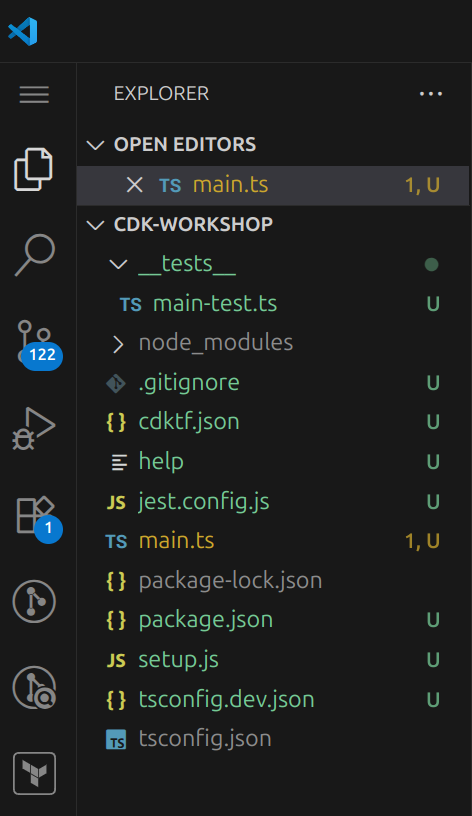
main.tsis where your CDKTN application's main stack is defined. This is the file we'll be spending most of our time in. this is also the entrypoint of the CDKTN application.package.jsonis your npm module manifest. It includes information like the name of your app, version, dependencies and build scripts like "watch" and "build" (package-lock.jsonis maintained by npm)cdktf.jsontells the toolkit how to run your app. In our case it will be"npx ts-node main.ts"tsconfig.jsonyour project's typescript configuration.gitignoretells git which files to include/exclude from source control.node_modulesis maintained by npm and includes all your project's dependencies.
Your app's entry point
Let's have a quick look at main.ts:
import { Construct } from "constructs";
import { App, TerraformStack } from "cdktn";

class MyStack extends TerraformStack {
  constructor(scope: Construct, id: string) {
    super(scope, id);

    // define resources here
  }
}

const app = new App();
new MyStack(app, "cdk-workshop");
app.synth();
This code defines, loads and instantiates the MyStack class. This is where the meat of our application is, the stack is empty for now.