API Gateway
- 1. TerraConstructs - AWS Intro Workshop: not reached
- 2. Prerequisites: not reached
- 3. AWS CLI: not reached
- 4. AWS Account and User: not reached
- 5. Node.js: not reached
- 6. IDE for your programming language: not reached
- 7. CDKTN CLI Toolkit: not reached
- 8. Terraform CLI: not reached
- 9. TypeScript Workshop: not reached
- 10. New Project: not reached
- 11. CDKTN init: not reached
- 12. Project structure: not reached
- 13. TerraConstructs: not reached
- 14. CDKTN synth: not reached
- 15. CDKTN deploy: not reached
- 16. Hello, CDKTN!: not reached
- 17. Cleanup sample: not reached
- 18. Hello Lambda: not reached
- 19. Optional - Watch: not reached
- 20. API Gateway: not reached (this page)
- 21. Writing constructs: not reached
- 22. Define the HitCounter API: not reached
- 23. Hit counter handler: not reached
- 24. Define resources: not reached
- 25. Use the hit counter: not reached
- 26. CloudWatch Logs: not reached
- 27. Granting permissions: not reached
- 28. Test the hit counter: not reached
- 29. Using construct libraries: not reached
- 30. Learning about the Table Viewer construct: not reached
- 31. Installing the library: not reached
- 32. Add the table viewer to your app: not reached
- 33. Exposing our hit counter table: not reached
- 34. Deploying our app: not reached
- 35. Extra credit: not reached
- 36. Clean up: not reached
- 37. Advanced Topics: not reached
- 38. Testing Constructs: not reached
- 39. Assertion Tests: not reached
- 40. Congrats!: not reached
Next step is to add an API Gateway in front of our function. API Gateway will expose a public HTTP endpoint that anyone on the internet can hit with an HTTP client such as curl or a web browser.
We will use Lambda proxy integration mounted to the root of the API. This means that any request to any URL path will be proxied directly to our Lambda function, and the response from the function will be returned back to the user.
Add a LambdaRestApi construct to your stack
Going back to main.ts, let's define an API endpoint and associate it with our Lambda function:
import { App } from "cdktn";
import { Construct } from "constructs";
import { AwsStack, AwsStackProps } from "terraconstructs/lib/aws";
import {
  Code,
  LambdaFunction,
  Runtime,
  LambdaRestApi,
} from "terraconstructs/lib/aws/compute";

class MyStack extends AwsStack {
  constructor(scope: Construct, id: string, props: AwsStackProps) {
    super(scope, id, props);

    // defines an AWS Lambda resource
    const hello = new LambdaFunction(this, "HelloHandler", {
      runtime: Runtime.NODEJS_24_X,
      code: Code.fromAsset("lambda"),
      handler: "hello.handler",
    });

    // defines an API Gateway REST API resource backed by our "hello" function.
    new LambdaRestApi(this, "Endpoint", {
      cloudWatchRole: false, // disable CW Logs for now
      handler: hello,
      registerOutputs: true,
    });
  }
}

const app = new App();
new MyStack(app, "cdk-workshop", {
  environmentName: "dev",
  gridUUID: "cdk-workshop-dev",
  providerConfig: {
    region: "us-east-1",
  },
});
app.synth();
That's it. This is all you need to do in order to define an API Gateway which proxies all requests to an AWS Lambda function.
cdktn diff
Let's see what's going to happen when we deploy this:
cdktn diffOutput should look like this:
cdk-workshop  Terraform used the selected providers to generate the following execution
              plan. Resource actions are indicated with the following symbols:
                + create

              Terraform will perform the following actions:
cdk-workshop    # aws_api_gateway_deployment.Endpoint_Deployment_318525DA (Endpoint/Deployment/Resource) will be created
                + resource "aws_api_gateway_deployment" "Endpoint_Deployment_318525DA" {
                    + created_date  = (known after apply)
                    + description   = "Automatically created by the RestApi construct"
                    + execution_arn = (known after apply)
                    + id            = (known after apply)
                    + invoke_url    = (known after apply)
                    + rest_api_id   = (known after apply)
                    + triggers      = {
                        + "redeployment" = "b66fffea26abdfc0e4889807f7ea0efd"
                      }
                  }

                ...

                # aws_lambda_permission.Endpoint_proxy_ANY_ApiPermissioncdk-workshopEndpoint424A4D39ANYproxy_628CE711 (Endpoint/Default/{proxy+}/ANY/ApiPermission.cdk-workshopEndpoint424A4D39.ANY..{proxy+}) will be created
                + resource "aws_lambda_permission" "Endpoint_proxy_ANY_ApiPermissioncdk-workshopEndpoint424A4D39ANYproxy_628CE711" {
                    + action              = "lambda:InvokeFunction"
                    + function_name       = "arn:aws:lambda:us-east-1:694710432912:function:cdk-workshop-dev-cdorkshopHelloHandler"
                    + id                  = (known after apply)
                    + principal           = "apigateway.amazonaws.com"
                    + source_arn          = (known after apply)
                    + statement_id        = (known after apply)
                    + statement_id_prefix = (known after apply)
                  }

              Plan: 14 to add, 0 to change, 0 to destroy.cdk-workshop

cdk-workshop  Changes to Outputs:
                + EndpointOutputs = {
                    + restApiId             = "xxxxxxxxxx"
                    + restApiName           = "cdkworkshopEndpoint424A4D39"
                    + restApiRootResourceId = "yyyyyyyy"
                    + url                   = "https://xxxxxxxxxx.execute-api.us-east-1.amazonaws.com/prod/"
                  }
That's nice. This one line of code added intricate resource configurations to our stack.
cdktn deploy
Okay, ready to deploy?
cdktn deploy --skip-synthStack outputs
When deployment is complete, you'll notice this line:
cdk-workshop
  EndpointOutputs = {
    "restApiId": "xxxxxxxxxx",
    "restApiName": "cdkworkshopEndpoint424A4D39",
    "restApiRootResourceId": "yyyyyyyy",
    "url": "https://xxxxxxxxxx.execute-api.us-east-1.amazonaws.com/prod/"
  }
This is a Terraform output that's
added by the API Gateway construct when registerOutputs is enabled and includes the URL of the API Gateway endpoint.
Testing your app
Let's try to hit this endpoint with curl. Copy the URL and execute (your
prefix and region will likely be different).
curl https://xxxxxxxxxx.execute-api.us-east-1.amazonaws.com/prod/Output should look like this:
Hello, CDKTN! You've hit /You can also use your web browser for this:
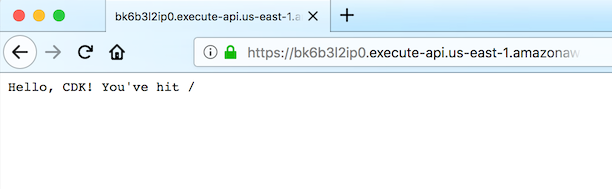
If this is the output you received, your app works!
What if it didn't work?
If you received a 5xx error from API Gateway, it is likely one of two issues:
- The response your function returned is not what API Gateway expects. Go back
and make sure your handler returns a response that includes a
statusCode,bodyandheaderfields (see Write handler runtime code). - Your function failed for some reason. To debug this, you can quickly jump to this section to learn how to view your Lambda logs.
Good job! In the next chapter, we'll write our own reusable construct.
Your endpoint
Paste the url from your EndpointOutputs. The commands on these pages will use it, and "Next" checks it against what each page expects.